PC Death!
So, I’ve not done too much with my NSLU2 recently as my PC died, so I had to sort out a replacement when I figured it was beyond repair. I’m now back online and will soon be looking into more ways to make my NSLU2 even more useful!

So, I’ve not done too much with my NSLU2 recently as my PC died, so I had to sort out a replacement when I figured it was beyond repair. I’m now back online and will soon be looking into more ways to make my NSLU2 even more useful!
So yesterday, someone tried in vain to hack into this website. I’m not quite sure why they’d bother, but 150 or so tries later they gave up…
It leads me to wonder how sad people must be to spend that amount of time trying to hack a website, for what purpose… to make them feel big, to make them feel good, superior?
Whatever it is, they really should try getting a life…
I’ve updated the website slightly to improve the URL structure.
I’ve taken advantage of WordPress’s permalink options to use the post slug in the URL rather than having ugly URL parameters that previously existed.
This makes the site that little bit more friendly and will hopefully make linking to the site that little bit easier. Any old links will still work and don’t have to be changed.
I recommend htop for any Linksys NSLU2 owner whos ‘unlsung their slug’.
htop is a package that can be installed through ipkg using the following command (as root)
ipkg install htop
It’s a curses based process viewer that lets you see, sort and kill processes running on the NSLU2.
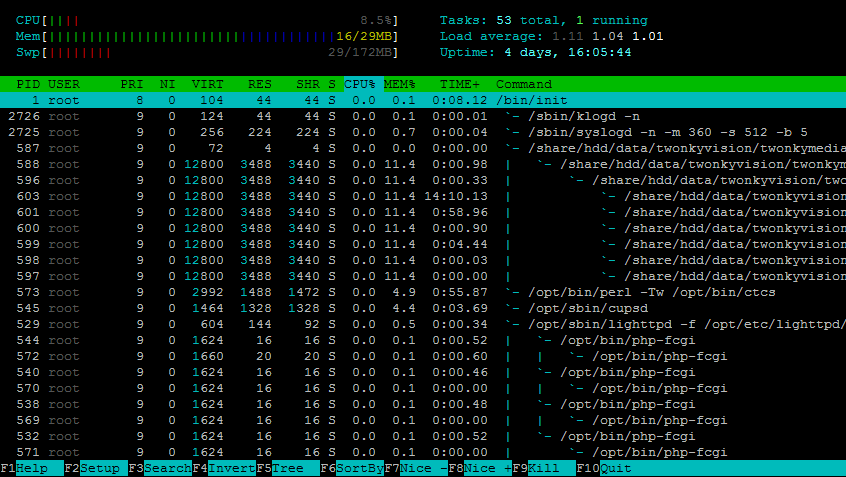
Click the image to see it actual sized.
Now that I’ve managed to copy all my important files onto the USB disk plugged into DISK1 of my NSLU2, I wanted to make sure I kept a backup of everything, and decided a good strategy would be to mirror files to the hard disk plugged into DISK2 (via my USB hub) of the NSLU2.
After looking at the linksys web tool and realising the backup stuff doesn’t work properly, I went looking for a smart way to do this, and settled on RSYNC, which can be installed via IPKG.
I use RSYNC to copy changes to a directory from one disk to another, and then have this scheduled to run once a week. I created a number of scripts to backup certain directories, and then schedule these to run on different nights of the week.
The script looks like the following:
#!/bin/sh

before="$(date +%s)"

fromdir="/home/user/"

todir="/share/flash/data/backup/user/"

logfile="/var/log/backup_users.log"

Set_Led beep2

date >$logfile

echo "----------------------------" >>$logfile

/opt/bin/rsync -avrlHpEog $fromdir $todir >>$logfile

echo "----------------------------" >>$logfile

after="$(date +%s)"

elapsed_seconds="$(expr $after - $before)"

date >>$logfile

echo Elapsed time: $elapsed_seconds secs >>$logfile

Set_Led beep1
My 3 cron entries I have for backups are as follows:
01 0 * * 0  /etc/cron.daily/backupUserDirs.sh

01 0 * * 1  /etc/cron.daily/backupRestorePC.sh

01 0 * * 2  /etc/cron.daily/backupMultimedia.sh